Sunday, 26 November 2017

How To Change Post URL of Already Published Post Without Losing Traffic-Diamondloaded

What you are going to learn today will help you throughout your online career. This tutorial is useful for any blogger, writer & SEO professionals.  In this guide you will learn about:

  • What is the slug in SEO
  • What are stop words
  • What is 301 permanent redirect
  • How to edit post slug of a new post in WordPress (BlogSpot users can follow this guide)
  • How to change the Post URL of already published post
  • How to set up redirection in WordPress
Most of us learn about on page SEO at the later stage of our online career. Chances are, you might have already published a good number of blog post before you learned about the keyword optimization.

If this sounds like your story?
Well, I’m sure the next thing that made you stuck in your progress is: How do I take care of already published posts?
If you had tried editing the post slug of your old posts, you might have encountered 404 error & various other issues. This guide is the answer to all your questions & issues that you may or might encounter while changing already published blog post link.
Before you look into the solutions, first you need to understand some basic yet most important SEO terms. This term applies to any kind of Website or blog that you are running. Knowing this will also help you to analyze SEO techniques of other blogs & make your blog structure more search engine friendly.

What is post slug in SEO?

To understand post slug you need to first understand permalink. Read this guide that explains what permalink is & best permalink structure for SEO.
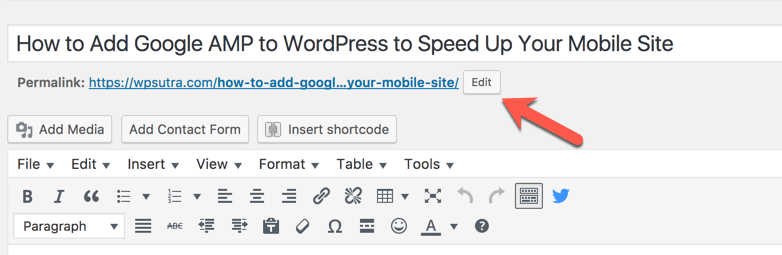
Post slug is the words that come in a blog post link after your domain name. For example,

Google-amp-WordPress is the post slug in the above screenshot.
In WordPress, post slug is automatically created from the post title. In the above screenshot, I have edited the post slug to make it search engine friendly.
Let’s take a step back & let me show you what is the default slug created by WordPress when you write a blog post.

As you can see the default slug created by WordPress is:
how-to-add-google-amp-to-wordpress-to-speed-up-your-mobile-site
The problem with default slug (Above example) are a lot of stop words which are useless & not recommended when you are optimizing your post for specific keywords.
This is a good time to learn about stop words.

What are stop words in SEO?

The most common words which are filtered by the search engine in a query are called stop words. An example of such words are: a, an, the, are, by, both…
There are many stop words that shouldn’t be part of your post slug. Here is the mega list of stop words.  Stop words are not used or weighted heavily to determine relevancy in search algorithms.
  1. Post slug with stop words: how-to-add-google-amp-to-wordpress-to-speed-up-your-mobile-site
  2. Post slug without stop words: Google-amp-WordPress
In the first one, you can see you have 13 words in your post slug. In the 2nd one, we have only three words in post slug. This means that the important keywords in the first option (Google-AMP-WordPress) are given only half the weight they would have if there were no SEO Stop words. The second one (Post slug without keywords) contains more keyword juice than the first one.
Bonus tip: You should avoid using too many stop words in your post title, description (Without affecting readability), image alt text.
I don’t recommend you to go back & edit all blog posts & change the slug to remove the stop words. However, you can do that for important published posts which are not performing at all. Moreover, using this you know how to take care of future blog posts.

What are 301 permanent redirects:

When you are changing the post URL or permalink structure, we use 301 redirects. This is the best way to ensure that users and search engines are directed to the correct page. The 301 status code means that a page has permanently moved to a new location. You can set 301 redirects using .htaccess at the server level or if using WordPress there are plugins to help you such redirection.
This is the best way to move your WordPress.com blog to self-hosted WordPress & migrate BlogSpot blog to WordPress.
We will be using 301 redirects to notify search engine when we change post slug. I have explained this in details in the upcoming section of this guide. For now, it’s a good time to watch this video to learn more about 301 redirection:

Subscribe on Youtube


How to change the Post URL of the new blog post:

When you are writing a new blog post in WordPress, click on edit below post title to change the post slug.
Clicking on edit will bring a screen like this where you can remove the stop words.
Make sure there is – (dash) between every word. Here is the final result:
This is one practice you should follow for all your future posts. Now, if you are wondering how to do it for already published posts, follow the steps.

How to change the Post URL of already published post

Like above, we do the same step for the already published post. When we edit existing slug, it would result in broken post. That means, if the search engine has already indexed your old slug or you have shared the post on social media, clicking on those links will result in 404 broken page. To avoid this, what we do is take help of 301 redirect feature.

How to set up redirection in WordPress

One of the reasons I love WordPress is for its simplicity to get tedious tasks done with the help of plugins. There are many WordPress plugins that will help you to set redirection. The one that I use is free redirection plugin. If you are using Yoast SEO premium, redirection feature is available for you already. You can also use any other plugin if you like. The only thing you need to ensure is, it should be a 301 redirection.
For this example, I’m using Redirection plugin.
Here is the scenario:
  • Already published post with URL: https://WPSutra.com/how-to-add-google-amp-to-wordpress-to-speed-up-your-mobile-site
  • New URL After editing the post slug: https://WPSutra.com/Google-amp-WordPress
Go to Tools > Redirection (or redirection tab of any other plugin that you are using). You can also set redirection using the .htaccess method.
Here you can set the 301 redirect from old post to the new one as shown in below screenshot:
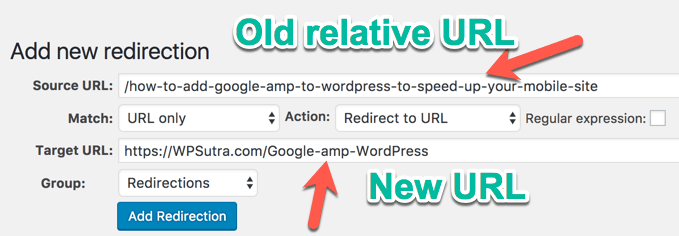
What this would do is, when someone will click on your old URL, they will be automatically redirected to new URL. This would ensure you wouldn’t lose any traffic after changing post slug of the already published post.
Do note that you would lose your social media shares number & that is a very little trade-off you need to make when dealing with editing old post URL. I usually do this for editing my old blog posts or dealing with non-performing blog posts.

Fine points when dealing with editing already published posts:

  • It’s completely fine to edit old post slug as long as you are setting up 301 redirect.
  • You would not lose any search engine traffic when editing post slug & setting up 301 redirect.
  • You would lose social media share as the post link changes.
  • It’s not recommended to change the slug of a high ranking blog post.
  • This is part of On page SEO.
From now on you should definitely practice this for all your new blog posts. At the same time, you can start editing post slug for the non-performing posts. Make sure you also follow steps listed here to make your post keyword optimized.
If you have questions regarding Stop words, 301 Perma redirect or changing post URL after publishing, feel free to ask in the comment section below. If you enjoyed this guide, do share it with your friends on Facebook & Google plus.

Best Keyword Research Tools For SEO: 2018 Edition-DIAMONDLOADED

Keywords are one of the most critical and important parts of SEO. We have already discussed this in detail here.
The basic foundation of SEO is keyword research.

Afterward, other factors like on-page optimization, quality of content, a good site UI, and some other factors come into the picture.
Many companies invest thousands of dollars to pay for keyword research to get such targeted content.

But you don’t need to do that. Just follow this guide…
The keywords you choose to focus on for your search engine optimization (SEO) efforts are critical to the success of your website’s rank.
Choosing the right keywords isn’t always easy or intuitive and you need a lot of data to know whether a given keyword will work for you.
    So now you know the basics of keyword research and you have an understanding of how valuable it can be.
    Fortunately, there are many tools available that can help you figure out which keywords work the best for your overall web strategy. There are mostly two types of Keyword research tool:
    1. Basic Keyword research: Use the seed Keyword to find profitable Keywords
    2. Competitor based Keyword research: Find proven keywords which are helping other sites to drive traffic.
    Personally, I find Competitor based Keyword research to be more effective as the purpose of the Keyword research is to find profitable Keywords. What could be more profitable than something which is already working for someone?
    All you need to do after that is to create a page targeting that profitable keyword & reap the benefit of keyword research.
    In this exclusive guide, I have covered both the type of Keywords. Most of these keyword research tools are paid and only a few of them are free.
    Here are the list of tools listed below:
    1. Google Keyword planner
    2. SEMRUSH  
    3. Ahrefs (Offers 14 days trial)
    4. LongTailPro
    5. KWFinder (Have free plan as well)
    6. SpyFU
    7. WordTracker
    8. SERPStat

    Best Keyword Research Tools: 2018 edition

    The Google Keyword Planner tool is one of the most used and popular keyword research tools out there.
    The only reason for it being so popular is it’s free and is directly integrated with Google AdWords.
    To start using this tool you need to have an AdWords account (which you can create one for free).
    • Features: The biggest feature of the Keyword Planner tool is the deep information it offers on Google (the largest search engine).
    • Limitations: In some ways, that’s also a limitation. If you want to know how your site or a given keyword is doing on other search engines, you won’t get it here.
    • Pricing: Free to use.
    The Keyword Planner tool is a good, basic tool for the early stages of a website’s SEO.
    This my favorite free tool, but if you need more detailed and competitive analysis, I would recommend going for one of the advanced tools that I have listed below.
    2. SEMRUSH <14-Day Free Trial (worth $150)>
    “What is the easiest keyword research tool for a blogger?”
    The answer:
    • SEMRUSH
    SEMRUSH is not a typical keyword research tool; it offers so much more than just researching keywords.
    Unlike other tools where you need to add seed keywords to start your research, here you just need to add your URL (or your competitor’s URL) and it will show you all of the keywords that are ranking for that site.
    This makes it easier for you to find short-tail and long-tail keywords that you can target and beat out your competition.
     You can get in-depth details on:
    • Traffic stats
    • Search engine reports
    • Adsense CPC
    • and so many other details that you need in properly managing an SEO campaign.
    3. Ahrefs Keyword Explorer tool
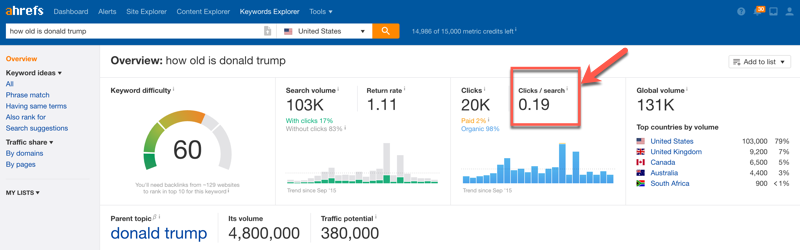
    Ahrefs is one of the most popular keyword tool out there. What I really like about them is extensive detail including the keyword difficulty. Ahrefs uses clickstream data to also show how many clicks you will get from search engine. This is very useful after knowledge graph integration, as many keywords may have huge traffic but they hardly get any clicks from search engine. Reason being, they get answers directly from the Google search result. Example of one such query is: “birthdate of any celebrity”
    Another thing which makes Ahrefs Keyword research tool stand out is the great UI & the amount of data they provide. You can also create a list of keywords to target directly from Ahrefs dashboard. You don’t need to use excel & this is a huge time saving.
    Take 14 days trial of Ahrefs
    4. LongTailPro <$30 Discount>
    LongTailPro is a cloud based software for keyword research and one of the most popular in this list.
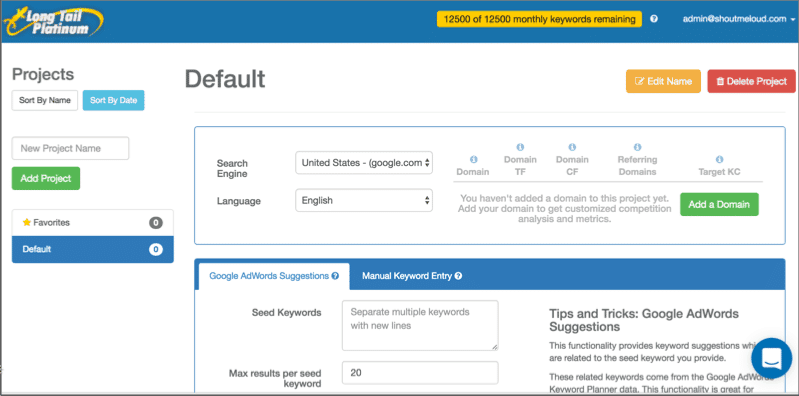
    This is a paid keyword research tool which will help you find amazing keywords for your niche/micro-niche sites. With their “platinum” version, you can get a really amazing and really detailed keyword analysis feature.
    They also have a competition checker, which will make it easier for you to pick the right keyword.
    5. KW finder: 
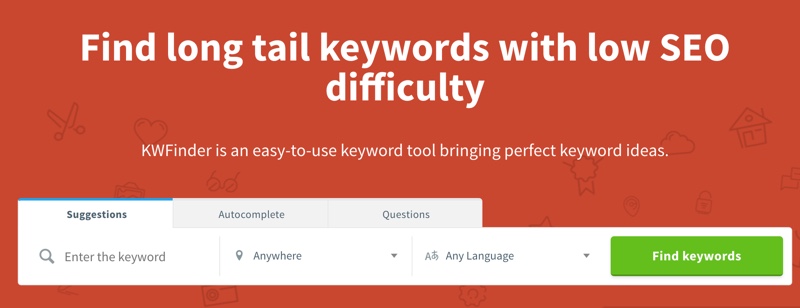
    If you are looking for one tool which is completely dedicated to Keyword research only, KWFinder is your best bet. They are new in the market yet they are one of the fastest growing SEO tool company.
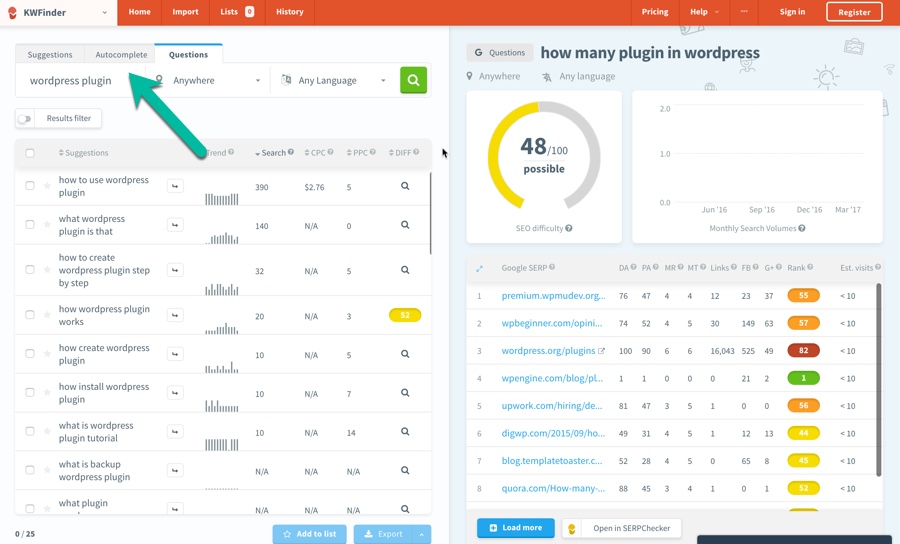
    KWFinder helps you get the Keyword that will help you drive highly targeted traffic. Using Questions based Keyword research option you can quickly find long tail keywords that are related to problem solving. It’s no brainer that problem solving content helps us get more targeted traffic & conversion.
    KWFinder offers both free & paid plans. For most of the users basic plan is the best. However do use the free account to see the effectiveness of KWFinder keyword research app.
    Visit KWFinder
    6. SpyFu
    SpyFu is one of the best SEO optimization software products on the market. It’s especially useful if you’re trying to analyze and stay ahead of the competition in a tight niche.
    Spyfu Keyword Research Tools
    Here’s what you need to know about this one:
    • Uses: SpyFu is highly useful for two important reasons.
      1. Understanding your competition’s SEO platform.
      2. Discovering under-served, un-tapped, or emerging markets.
    • Features: SpyFu also has several modules.
      • Compare Websites module
      • Keyword History module
      • Domain History module
      • Related Keywords module
    • Limitations: This program doesn’t have the depth of keywords that some competitors do, although this is changing. Also, the data for SpyFu is monthly,rather than real-time.
    • Pricing: SpyFu offers two basic pricing plans as well as an “Agency” plan.
      • The basic plans are $79 and $99 per month (with a discount of more than 40% if you buy a one year term).
      • The “Agency” pricing is $999 per month.
    SpyFu is a solid SEO product.
    It’s useful if you want to check up on the competition as well as find new areas in which to market.
    Check out SpyFu here
    7. WordTracker
    WordTracker is used by small businesses to research keywords, build new links, and develop a strategic SEO platform.
    • Uses: The three main tools in WordTracker are the-
      • Keyword Tool (which helps you research keywords)
      • Link Builder (which identifies inbound link prospects)
      • Strategizer (which takes a step back and looks at your entire SEOranking strategy).
    • Features: There are some features that are really cool here.
      • The Link Builder tool is unique to WordTracker and are not found on any of the products on this list.
      • The Strategizer gives you a kind of bird’s-eye view that you won’t get anywhere else.
    • Limitations: WordTracker often gives fewer results than other services and the interface isn’t particularly intuitive.
    • Pricing: WordTracker includes a 30-day free trial.
      • Monthly pricing is $69 per month.
      • Subscribe to a full year at $449.
    I would not recommend you pick up all of the tools listed above, but instead stick to one or two and get used to its system.
    If you have been using the Google Keyword Planner tool for a while, you have a good basis for getting started with any of the paid and professional tools listed here.  Take a look at some of these tools and decide which works best for your business strategy.
    My recommendations:
    • If you are looking for an easy, yet a great solution, go for SEMRUSH.
    • If you are researching keywords for micro-niche sites, use Ahrefs
    Whatever you choose, use these tools to supercharge your SEO.
      Are you using one of the keyword research tools from the above list? How has your experience been so far? Share your thoughts in the comments!
      Did you find this guide useful? Share it with your friends on Facebook, Twitter, and Google Plus!

      You Lose Traffic After Migrating To HTTPS? Here’s How To Fix it

      • Should you move your website from HTTP to HTTPS?

      • Is it worth moving an information site like a blog to HTTPS?
      These were some of the questions we all had last year when HTTPS became really common.
      If we look at the current trend, it’s a no brainer that our sites should be using HTTPS.
      And when you are starting a new site & implementing HTTPS, things are easy.
      However, when you are moving an existing/running site from HTTP to HTTPS, things are not that simple.
      Moving to HTTPS is indeed a big technical SEO change. At times, people make mistakes here & start losing their SEO traffic.
      However, one can quickly avoid this if they are following all the right steps before & after moving their site from HTTP to HTTPS.
      There are a few tools that let us check for proper SSL implementation, but they are not geared toward SEO. These tools usually check for canonical & SSL certificate implementation, which is not enough when you are doing an SEO audit after moving your site to HTTPS.
      So, what’s the solution?
      SEMrush, which is the most popular SEO tool, recently added an HTTPS implementation audit feature in their site SEO audit feautre. As some of you may know, SEMrush is the most comprehensive HTTPS SEO audit tool I have ever come across.
      In this guide, I will share how you can use this tool to check if there’s anything wrong with your HTTPS implementation.
      If you have migrated your site from HTTP to HTTPS recently and have noticed a drop in traffic, or if you are planning to move your site to HTTPS sometime in the future (which you should), this is the tool that you should be using.
      SEMrush is a paid tool, however, you can use the link below to sign up for a 14-day free trial (you can simply cancel the subscription before 14 days is up).

      How To Use The HTTPS Implementation Site SEO Audit Feature

      Note: This feature can be used by existing SEMrush users & new users who are signing up for the first time.
      Here is what you need to do:
      • Create an account on SEMrush or log in to your dashboard.
      • Click on Projects on the left side column.
      HTTPS Implementation Site SEO Audit
      • Click on Add New Project & give your project a name (see the below screenshot for the reference).
      Add new Project
      • Click on Save & then click on the “Site Audit” option.
      Site Audit
      This part is pretty easy & straight forward.
      • Depending upon your site’s size, select the number of pages you want to be crawled.
      Site Audit Setting
      SEMrush crawlers will start crawling your site & within a few minutes, you will have your report ready.
      Along with any HTTPS issues, SEMrush will show all other SEO issues present on your site.
      In my case, it took about 5 minutes to crawl 400+ pages.
      • Now, open up the generated report & on the next page, click on the HTTPS Implementation tab to find all existing HTTPS implementation errors on your site.
      HTTPS Implementation
      In this case, all reports are OK apart from one subdomain HSTS issue (which is not major).

      An Example Of An HTTPS Implementation Error:

      Let’s look at ShoutMeLoud, a big site where there are a few HTTPS SEO issues.
      This is a screenshot from the ShoutMeLoud.com HTTPS audit report:
      HTTPS Implementation Error
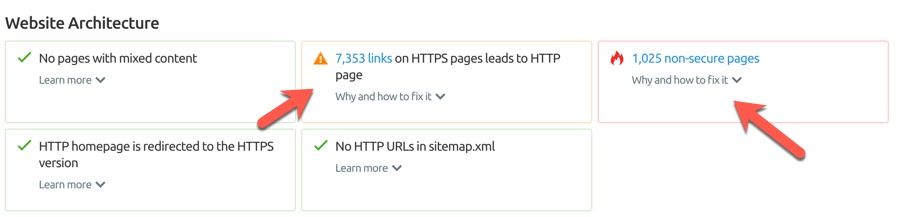
      Here I have discovered a few site-wide links which are still HTTP.
      Site Audit site-wide links
      Fixing this issue helped me lower down the number of redirections & will help search engine bots to crawl the site more effectively.
      Discovering non-secure pages:
      This issue is triggered if the SEMrush Bot detects an HTTP page with a <input type=”password”> field. Using a <input type=”password”> field on your HTTP page is harmful to user security, as there is a high risk that user login credentials can be stolen. To protect users’ sensitive information from being compromised, Google Chrome will start informing users about the dangers of submitting their passwords on HTTP pages by labeling such pages as “non-secure” starting January 2017. This could have a negative impact on your bounce rate, as users will most likely feel uncomfortable and leave your page as quickly as possible.
      If you have effectively implemented an SSL certificate & are serving all of your pages properly, this result should show zero non-secure pages.
      However, in my case, I have 2 sub-domains which I have yet to move to HTTPS.
      Site Audit
      Depending upon the complexity of your or your client’s website architecture, this tool can help you discover severe SEO issues which are not easy to discover manually.
      Most of you who have used my earlier guides on HTTP to HTTPS migration will either have no issues or very minor ones.
        However, it would be very unwise for anyone to be over confident & not use another tool to ensure the HTTP to HTTPS migration is problem-free.
        Since SEMrush offers a 14-day free trial, it’s a good starting point for anyone to test out their HTTPS implementation.
        Let us know what kind of HTTPS implementation issues you have found using this tool. Also, if you are stuck somewhere while fixing the issue, let me know in the comments section below and I will help you along.
        Know someone who is waiting to migrate from HTTP to HTTPS? Share this guide with them to help them avoid any SEO blunders!

        Thursday, 23 November 2017

        Top 10 Best Google Adsense Alternatives (2017)

        “Your Google Adsense account has been disabled or temporarily banned”.
        What a nice phrase on an email to start the day huh? Well, consider you’re not alone. Everyday, hundreds or thousands of accounts are being banned from Google’s Adsense program. Why? I can’t tell you specifically. Either there’s something wrong with the web you’re putting you ads on, or you just simply missed one rule from Google’s TOS.

        Instead of crying or bashing Google in multiple forums (actually, this is a very bad idea), remember the world is not over yet, and there are plenty of alternatives out there to try. Google was just your first one, and you failed.
        So, stand up, be proactive and act professional! There’s no time to lose.
        Updated July (2017):
        • Propellerads is working super good the last 3 months! Moved to no.2
        • Media.net has been moved to 1st placed due to good performance among the people who test it.
        • Revenuehits has a summer promo!

        10 best Google Adsense Alternatives

        Here are some of the best Google Adsense Alternatives you can try to monetize your website without using Google Adsense, and I’ll tell you how they work and why you should consider them, so let’s start:

        10. Amazon Associates

        Google Adsense Alternatives Amazon
        You can make a good amount of money from Amazon, especially in Christmas and other holidays
        Amazon is the biggest online store in the world, so they must be doing something good. Well, if you have a website that talks about any product that can be found on Amazon, then Amazon associates could work for you. Amazon allows you to put dynamic image ads to your blog, so that you can promote them and while this isn’t a Pay-per-click or CPM program, it will pay you a small commission for everything they sell from your links. So let’s say you have a blog about Apple products and you put an ad driving them to buy an iPod or just a cable. If they buy it, an small commission will be for you. So if you sell a $10 cable you might receive a few cents, but sell a $1500 Laptop and you might receive $100. The good thing is that everything they buy through your link (even if it isn’t the product you recommended at first) will generate a commission for your. the only con I find with Amazon, is that they need to send you a check that could take weeks to arrive to your home, unless you live in the United Stated of America where you can provide your Bank account. You can use this with Adsense at the same time.

        9. Yllix Media

        Yllix is a network I have heard a lot in the last years that has a decent CPM and many monetization options. Their homepage might look simple but their dashboard is great and it’s easy to get started. Yllix has Pop under ads, mobile redirects, sliders, layer ads and full page ads so you can get a good CTR and make money with them. Definitely a good option for starters and their approval is fast. Sign up here.

        8. Revenue Hits

        Revenue Hits is a very strong network with several years in the industry. I’ve been working with them for 2 years and so far the results have been great. Revenue Hits is a Performance Ad network, which means they pay you for results (CPA, which is great for many niches). Revenue Hits has an advanced platform that learns from your Ads so if you give them a try make sure to keep their ads running for at least 3-4 days to get the best results. Another great thing is that they have different monetization channels available. You can create banner ads, sliders, pop -unders, buttons and more. Revenue Hits pays on a NET 30 basis and they issue payments via wire, Paypal and Payoneer! Create your account and get started in just a few minutes HERE!
        Bonus: Read my full RevenueHits Review where I show you how I earn more than $1,000 per month and take advantage of the summer promo where you can get up to $900 extra for your traffic!

        7. Adversal

        Adversal is a great alternative of Adsense. They have good banners and the CTR and revenue adapts to get the best results for your website. I’ve seen the Ads on Adversal have a good CTR and they have good image ads too. This is probably the Ad network which seems to work better for those looking for a replacement of Google Adsense. It works decently with other languages too.  You account gets approved really fast and they also have Pop under /CPM ads as an option. Note: Adversal requires a website with a minimum of 50,000 page views per month, but they have proven to work really well. I earn over $500-1000 per month. They also pay via paypal. Sign up here. Bonus: Check my Adversal earnings here.

        6. Chitika

        The reason I put Chitika on the number 3 of this list, is because Chitika is very similar to Adsense. they allow you to customize your ads, and it only serves contextual ads. One good thing is that you can use it along with Adsense and there are no problems at all. Chitika pays via Paypal ($10 USD minimum, which is good for starters) or via check ($50 minimum). If I were to recommend an ads service as an alternative to Adsense, Chitika would be my first choice, hands down. Chitika can pay you via paypal if you need. Sign up here and get your account approved fast and easily! Bonus: Check my Chitika earn

        4. Infolinks

        Popcash is another very good network that has been out for a long time and usually gives me similar results as PopAds (see number 4). PopCash has PopUnder ads with a great CPM and good inventory for all countries both for mobile and desktop traffic. You can request your payments inside the dashboard and they pay via Paypal, Payza and Paxum. Money transfers usually take 24-48 hours which isn’t bad at all. Sign up here and get started with Popcash.

        4. Infolinks

        Infolinks is one of the largest monetization networks in the world today, helping more than 200,000 online publishers in 128 countries earn money from their unused ad space. Their FREE to use native ads work perfectly with all ad solutions and don’t interfere with the user’s experience! From effective contextual and video ads, to engaging display banners – Infolinks’ highly customizable products will guarantee you make the most out of your traffic.
        Their platform is very simple to integrate into your site, and is open to any publisher, big or small, with no setup fees, no minimum requirements for page views or visitors and no hidden commitments. Infolinks advertisers are selected based on quality, that’s why they work with worldwide leading brands such as: Facebook, Amazon, Ebay, Ali Express, Pizza Hut, TripAdvisor, Hyundai and many more. Start using Infolinks here.

        3. PopAds

        PopAds is a performance network specialized in Pop Unders. They have good rates and they can monetize all countries. Something great about PopAds is that they can pay daily as long as you earn $5 or more per day. Their quality is good, and they also have pop ups, tab ups/unders and other monetization methods. Their approvals are easy and setting your ads takes just a few minutes. Sign up as a publisher here.

        2. PropellerAds Media

        Propeller Ads is one of the biggest pop-under networks available. They started working in 2011 and quickly developed into one of the biggest networks with great CPMs. They specialize in monetizing websites for the following niches: entertainment, videos/movies, games, dating, finances, software, gambling and more. If you’ve got one of this sites, you could make more money with Propeller than with Adsense. They also have banners but the pop unders work better overall. Also, if you’ve got mobile traffic, they’re a great Adsense alternative as they work closely with ad networks that monetize apps and mobile services leading to huge ROIs and great CPMs too.
        Propeller pays on a NET 30 basis and they have a great fill rate for tier 2-3 countries. So if you’re struggling to monetize traffic from countries like India, Singapore, Turkey, South Africa, etc. Propeller has a big inventory for them too. Sign up as a Publisher with Propeller Ads here. 
        Bonus: Check how to setup PropellerAds  and a case study on how to make $300 per day with PropellerAds and viral websites.
        Propellerads

        1. Media.net

        If you’re looking for the most similar Adsense Alternative, here you have it: The Adsense for Yahoo and Bing. Media.net is an industry-leading technology company that develops innovative digital advertising products for both publishers and advertisers. They have over 500 employees in key operation centers across – New York, Los Angeles, Dubai, Zurich, Mumbai & Bangalore.
        By Revenue, Media.net runs the #2 largest contextual ads program globally. Media.net powers the Yahoo! Bing Network Contextual Ads program. Media.net exclusively manages technology, business operations and relationships with respect to publishers worldwide for this program. Today, Media.net is a leading global contextual advertising company that provides a wide range of advertising and traffic monetization solutions to a substantial and diversified client base. With more than 500 employees, Media.net has one of the largest teams worldwide building a global contextual advertising business. Plus, they take 2 days on average to get your account approved and will give you an extra 10% over your earnings the first 3 months! (way better than waiting weeks for an Adsense approval). Sign up here.
        BONUS: Affiliate Marketing
        I’m leaving affiliate Marketing in the number 1 spot for many reasons. Affiliate Marketing means you’re selling a product or a service from another enterprise (which means you don’t have to develop it) and you earn a commission for that. You can find a lot of Affiliate Marketing programs on the net, and they can vary from selling a $10 small product up to selling a $300 software. The beauty of affiliate marketing is that the more you know and test a product or service, the more you can sell it.
        Some affiliate programs can earn you more than $50 for each sale depending on the product and I truly recommend you test and backup your sales by using the product yourself (even though it’s not 100% necessary). If you are an authority in a niche, you can use it to boost your sales and grow even more. You can set affiliate links in banners, text, images and basically everywhere, and it can grow into a big passive income earner if done well. Some examples of people that have become very successful with affiliate Marketing are:
        • Pat Flynn from the Smart Passive Income blog
        • Luke Kling from Peerfly
        • And more people that earn 6 figure incomes per month, mostly via passive income or PPC campaigns.
        The BEST WAY to get started at affiliate marketing is by joining a Forum and reading affiliate marketing blogs. I recently opened a new “Affiliate Marketing” category in this blog where I’ve posted some great case studies.

        What can I learn from this?

        Life can be rude sometimes. You Google Adsense account could have been banned because you didn’t catch a rule from the TOS, or maybe it was a mistake, however, you can’t always rely only on 1 solution. The secret word here is to “diversify”. Try to have as many income streams as you can by adding and testing different ad services, and you’ll find your way to the top. Those Google Adsense alternatives will help you develop as an Internet Marketeer even more.
        Even if your Google Adsense account was banned, this is not the end of the world. In fact, it’s only the beg